Email Performance Dashboard
Problem
SocketLabs had rich email-deliverability data, but users lacked a clear, high-level view of sending health and an easy way to identify what needed attention.
Role
I led the UX and Product Design, translating complex deliverability data into user flows, wireframes, visualizations, and a scalable dashboard experience.
Solution
Designed StreamScore, a simplified health score and dashboard that lets users quickly spot performance changes and drill into the issues driving them.
Impact
Made complex deliverability signals easier to understand and act on, creating a clearer path from monitoring overall health to diagnosing specific problems.
Anticipate email deliverability issues before the problem happens.
Strategy:
Create a one-stop shop to see my entire email deliverability status.
Provide opportunities for users to drill down and solve deliverability problems ie: failed delivery, wrong emails etc. Update the look and feel to use in Product Marketing Material
Email Expert
Role: Marketing or CRM team member
Profile: Understands email delivery from a content and engagement perspective
Goals: Monitor engagement and inbox placement
“Who needs to track and send bulk email?“
Audience
To ground our design decisions in real user needs, I collaborated with Marketing, Support, and Sales teams to identify key user types through first-hand interviews and subject matter expert input. This discovery process led to the definition of two primary personas:
System Admin
Role: Infrastructure/IT team member
Profile: Deep technical knowledge of email systems and server-side delivery processes
Goals:Quickly identify and resolve delivery issues

Conceptual Mapping
Visualizing the Deliverability Ecosystem
To understand the email deliverability ecosystem and guide dashboard decisions, I mapped how sending servers, domains, inbox providers, and performance signals connect and flow into SocketLabs.
The map traced key signals, including bounce codes, engagement, SPF, DKIM, and DMARC, and showed how they feed into StreamScore and the Dashboard.
This helped me determine how to organize complex deliverability data so users could quickly understand where issues originated, what they affected, and where to take action.
“Who is doing something similar?”
How do we compete?
User Story Mapping
Mapping the Email Score Alert Experience
I mapped the user journey around monitoring email performance, identifying score changes, investigating issues, and taking action. Pairing each step with supporting features helped uncover pain points, prioritize functionality, and define a clearer path for sprint planning.
Competitive Analysis
Positioning Stream Score in the current landscape
I identified a gap between deep technical diagnostics and a clear, at-a-glance view of overall performance. While competitors emphasized granular data, few provided proactive summaries or visual cues that surfaced emerging issues, such as declining engagement, rising spam complaints, or deliverability risks, before they impacted revenue.
Ideation Sketches
Exploring the Data Visualization Drill-Down
I explored ways to break the overall score down by domain, helping users move from a high-level signal to the metrics driving it. Early concepts surfaced bounce rates, authentication failures, blacklist status, and engagement trends, allowing users to quickly identify underperforming domains and potential causes.
The sketches also established a modular approach to trend visualization, status indicators, and recommended actions.
Wireflow
From High-Level Trends to Domain-Level Diagnostics
I mapped the flow from overall deliverability performance to domain-level diagnostics, allowing users to quickly spot underperforming domains and drill into the metrics driving the score, including bounce rates, spam complaints, authentication failures, and blacklist status.
The flow supports four key needs:
Monitor performance across domains at scale
Investigate sudden score drops
Pinpoint issues by date and time
Act on the specific cause of failure
Wireframes
Modular Dashboard for Email & Account Visibility
I designed the dashboard as a modular, centralized hub for monitoring email performance across multiple sending domains. Key components surface deliverability scores, authentication health, blacklist alerts, and performance trends at a glance.
Beyond visibility, the dashboard provides clear pathways to investigate domain-level issues, identify potential causes, and take corrective action.
Visual Design System
Enhancement & Brand Alignment
I evolved the dashboard’s visual language while maintaining alignment with the SocketLabs brand and existing design system. My contributions included refining dashboard cards, data tables, score indicators, alert states, trend visualizations, typography, spacing, color usage, and iconography.
I also established consistent patterns for domain health, authentication status, warnings, and drill-down actions, making complex deliverability data easier to scan and prioritize.
These updates created a more cohesive interface while ensuring new components could scale consistently across the platform.


Server Setup Status Bar Design
The status bar gives users a clear view of their onboarding progress across four key steps: signing up, sending a first email, setting up authentication, and enabling click-tracking analytics. By visualizing these steps together, the bar helps users track their progress, understand what’s left to complete, and build confidence that their server is fully ready for reliable sending.
Server Details Design Deliverability Status
The Server Stats component surfaces critical account metrics — API calls, billing period, and bandwidth usage — each paired with an intuitive gauge. This design gives users an immediate sense of their system’s performance and resource consumption, helping them anticipate limits before they impact deliverability or incur extra costs. By turning complex usage data into simple visual gauges, the dashboard empowers users to monitor server health at a glance and take proactive action when needed.
“Setup your server fro the best email deliverability.”
“Measure the effectiveness of each email campaign.”
“Provide a snapshot of all accounts and email performance.”
Per-Mailing Performance Table
The performance table provides a detailed breakdown of each mailing, including delivery rates, failures, opens, clicks, complaints, and unsubscribes. With filtering options by day, hour, ISP, or sending domain, users can drill into specific segments to identify trends and issues. By surfacing both engagement and deliverability metrics side by side, the table empowers users to measure campaign effectiveness, troubleshoot problems, and make data-driven improvements.
“Provide data on all email metrics (clicks, opens etc.)”
The StreamScore widget gives users a clear view of email health over the last 30 days, combining an overall score, trend line, and domain-level details. By surfacing key metrics like authentication status, week-over-week and day-over-day changes, it helps users quickly gauge deliverability performance and take action to keep campaigns on track.
Performance by Date Range Design
This component lets users define a start and end date to view engagement metrics—such as clicks, opens, and deliveries—within a chosen timeframe. By adjusting the range, users can analyze short-term campaign results or long-term trends, making it easier to measure impact, compare performance, and optimize future sends.
“Take action based on the score”
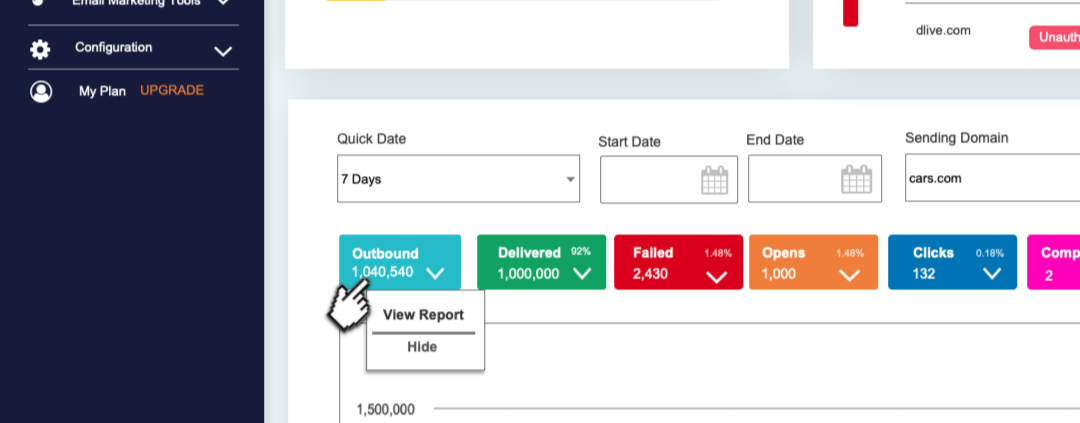
View Reporting, from the dashboard, click to view a more detailed breakdown of each metric
The Big Picture. I designed a system where users can start with a high-level score—representing overall email health—and drill down into specific focus areas, such as engagement performance.
Within the engagement view, users can explore how open rates, click-throughs, and interaction patterns directly impact their overall email performance. This level of visibility helps both technical and marketing-focused users understand not just what is happening, but why it’s happening—empowering them to take informed action before problems escalate.
“A look under the hood: Diagnostics.”
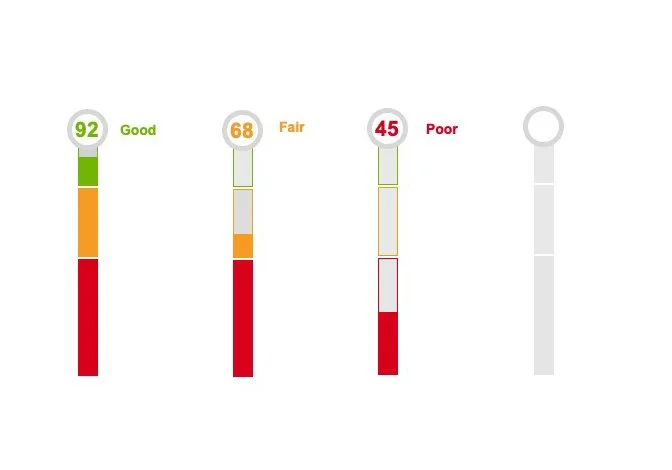
The StreamScore widget gives users a quick read on email health with a red–yellow–green gauge, a 30-day trend line, and domain-level details. Clicking StreamScore Details opens a deeper breakdown of contributing factors—such as audience, engagement, and reputation scores—so users can move seamlessly from a high-level view to actionable insights that keep campaigns on track.
“Helping users understand not just their current status, but how each element contributes to the overall score.”
Score Trickledown: Server-to-Domain Visibility Drawer
Introduced a drawer component within the UI that users can open to view a timeline of outgoing email performance across domains. This drill-down capability empowers users to diagnose problems more effectively, trace them back to their source, and prioritize which domains may require attention first—all within a seamless, intuitive interaction pattern.
Build trust through transparency.
That meant not only visualizing the score itself, but also clearly communicating how it’s formulated and what underlying metrics influence it. Audience health quality, invalid addresses, and complaint rates. Engagement. Open and click-through rates, reply behavior, and time spent reading. Reputation – Historical sending behavior, spam complaints, and blocklist status. Security – Protocols like SPF, DKIM, and DMARC that verify sender identity
The StreamScore interface breaks this complexity down into digestible components, helping users understand not just their current status, but how each element contributes to the overall score.

Conclusion: Bridging Deliverability and Engagement
Overall, the redesigned dashboard successfully supported the needs of both primary personas—System Admins and Email Experts—by delivering clear, actionable insights across technical performance and marketing engagement.
By surfacing real-time deliverability metrics alongside user-friendly engagement data, the experience empowered users to not only troubleshoot infrastructure issues, but also optimize email campaigns proactively. The integration of StreamScore, domain-level drilldowns, and visual alerts helped close the gap between technical complexity and strategic decision-making—turning the dashboard into a true command center for email health.
This project demonstrates the impact of UX thinking when applied to deeply technical products: when clarity, hierarchy, and transparency are prioritized, even complex systems become approachable and effective.