SocketLabs Onboarding Experience
Overview
As a UX/Product Designer, I led onboarding design for email senders at SocketLabs, collaborating closely with a developer-heavy team.
Role:
UX/Product designer
Product Discovery, Strategy, Research, Visual Design, wireframing documentation hand off, QA collaboration, and clarity.
Collaboration
Marketing to bring more light to the new code libraries SocketLabs Offered
Development to implement the design
QA testing
Problem
Analytics revealed that Users would sign up to SocketLabs but not get a full breadth of the platform,
Approach:
Baseline User research is done as part of the discovery
Agile, Daily Stand up, 3 sprints, UX Stays ahead of each sprint and follows up with QA Testing
“Lets see how users make it through the onboarding phase”
“Customers wanted reassurance that SocketLabs provided the necessary tools and infrastructure before committing to long-term use. “
I conducted interviews with several developers and system administrators to walk through the SocketLabs platform and gather insights into their expectations and mental models. These sessions revealed valuable details about the language users naturally use and the types of information they expect to see surfaced during onboarding.
A key finding was that much of the friction occurred around sign-up and locating the API credentials needed for integration. Users wanted reassurance that SocketLabs provided the necessary tools and infrastructure before committing to long-term use. This insight informed design decisions around making credentials more transparent, accessible, and easy to verify early in the onboarding journey.
“These users have specific needs and behaviors that we need to align on.”
Audience
To ground the design in real-world needs, I created personas based on interviews with developers across different experience levels. These personas highlighted variations in technical skill sets, preferred tools, and common pain points during the onboarding process.
By understanding how junior developers, senior engineers, and system administrators approach email integration, I was able to design an onboarding tool that feels more “turnkey” — reducing technical barriers, surfacing the right guidance at the right time, and ensuring a smoother path to successful setup for all user types.
Key User Objectives!
Defining the overall flow and User Objectives
When exploring SocketLabs’ onboarding, I identified three major steps in the user journey:
Sign Up & Provisioning – New users are onboarded with safeguards in place to prevent abuse from bad actors while still ensuring a smooth registration process.
Integration via API or SMTP – Developers need quick access to clear setup instructions. This step is often the biggest friction point, so I designed an integration screen with language-specific code snippets (PHP, C#, Python, Go, Java) to accelerate implementation.
Test & Authenticate – Users can send a test email immediately after setup, then are guided to configure SPF, DKIM, and DMARC records to fully authenticate their domain and improve deliverability.
“Distilling Onboarding into 4 major steps”
“Each objective has smaller steps, such as adding a Sending Domain or multiple Domains. How many should we allow for the first sprint?” Users only need to or 3 to run a test.
I created a story map to identify the major steps in the SocketLabs experience and highlight where new features could provide the most value. Each stage of the journey included opportunities to reduce friction and increase confidence for developers
Product Positioning
“What unique value can we offer that competitors do not?”
I conducted a competitive analysis of adjacent platforms including SparkPost, Mailgun, SendGrid, and Mailjet.
I walked through core patterns across the competitor set, focusing on:
Sign-up & Provisioning – how accounts are created and safeguarded against misuse.
Adding Sending Domains – the workflows competitors use to guide users through authentication and setup.
I identified best practices worth adopting while also surfacing areas where SocketLabs could simplify the experience and stand out in the market.
“UX Strategy: Lets step back and look at the whole picture. “
Lo-Fi Sketch: Sending Domain Management
I designed a low-fidelity sketch where users can enter and manage their sending domains. Since the health of a sending domain is critical to successful email delivery, the interface surfaces a clear status table that displays:
Authorization status (SPF, DKIM, DMARC alignment
Encryption status, Engagement indicators
This view brings domain health front and center, helping users stay aware of potential issues and maintain strong deliverability.
“We are the developer friendly service, and provide email expertise”
Designing the Integration Experience
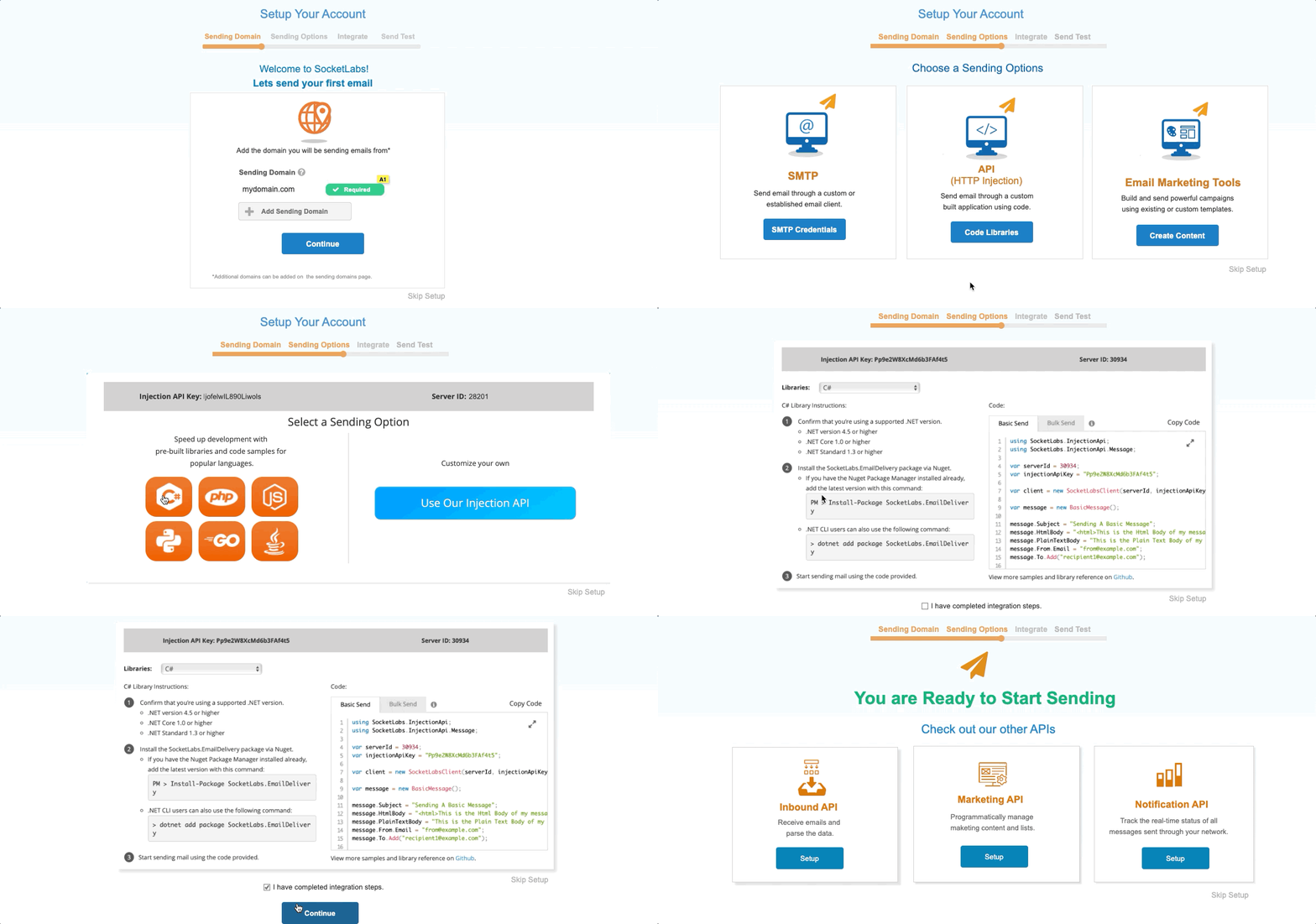
After mapping the overall flow and identifying the required pages, I quickly built a prototype to help developers get started with bulk email integration faster. To reduce friction, I placed the key integration components in two places:
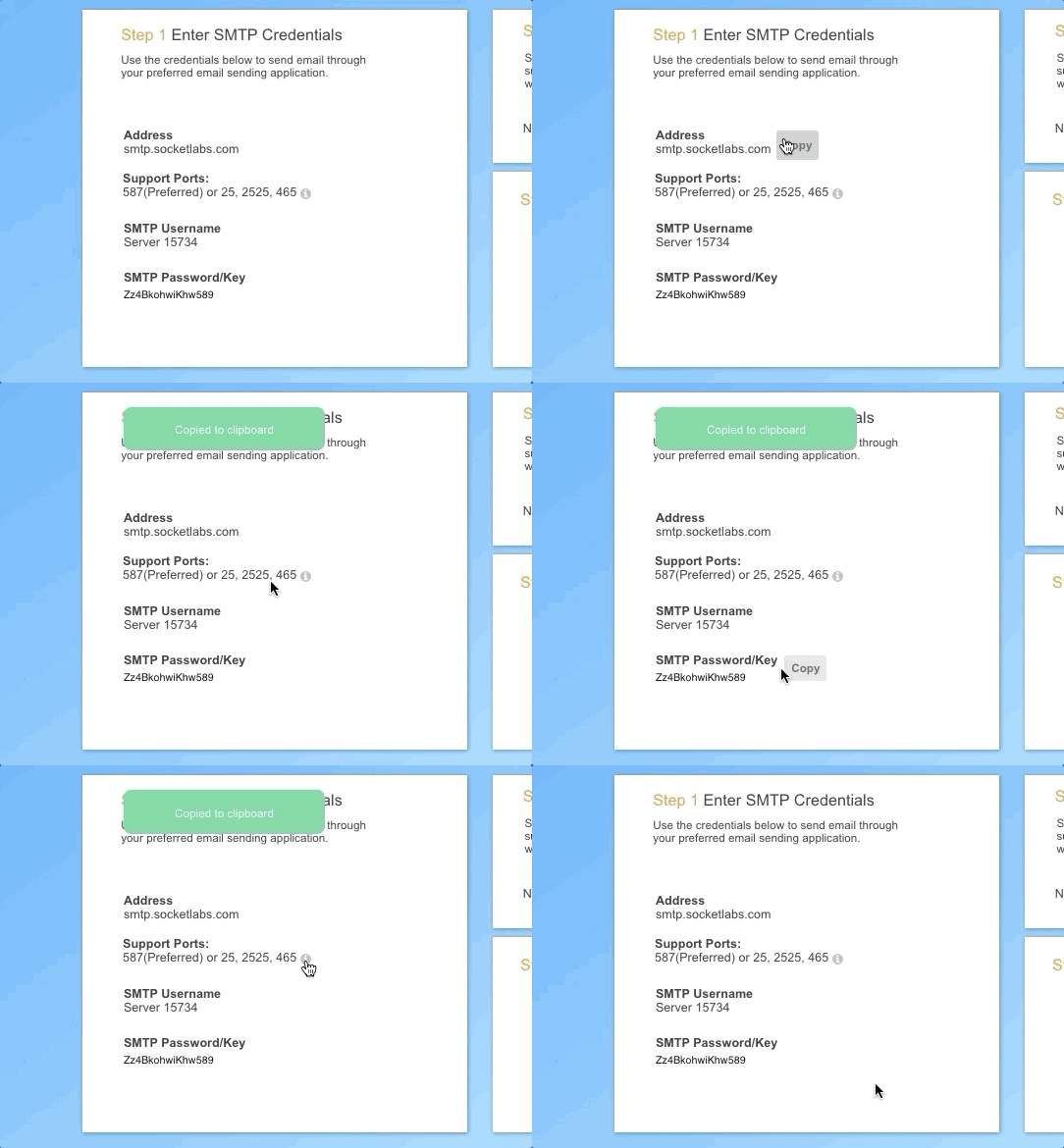
Onboarding wizard – where users immediately receive their SMTP credentials and API code snippets as part of the setup process.
Dedicated integration pages – where the same resources are always accessible in context, so developers don’t need to dig through documentation or switch tools.
This approach ensured that critical setup information was surfaced at the right time and place, helping users move from sign-up to successful integration with minimal effort.
“Rapid prototyping provides a level of realism that wireframes alone can’t convey.”
“We want the design to speak to the developers who integrate with our platform.”
Challenge:
After completing integration, many users were uncertain whether the system was correctly configured. This hesitation often delayed their first email send, which is a critical milestone for building trust in the platform.
Solution:
I designed custom iconography that clearly signals when SocketLabs is ready and awaiting the first email. This moment reassures users by validating that the server is functioning correctly while also creating an engaging prompt that encourages them to take the next step and begin using the platform.
Developer-Centric Bulk Email
To support developers integrating with SocketLabs’ email delivery API, The screen helps technical users quickly copy, customize, and test bulk email requests without digging through documentation. By presenting language options in a clear, tabbed layout with syntax-highlighted examples,].
“I designed custom iconography to confirm the server was ready and prompt users to send their first email.”
“Education, Help Documents for domain authentication instructions”
“To further reduce friction, I created step-by-step instructions and expandable troubleshooting drawers”
Domain Authentication Education
Challenge:
Authenticating a sending domain (via SPF, DKIM, and DMARC) is often treated as an afterthought by users, even though it’s a critical factor in email deliverability.
Solution:
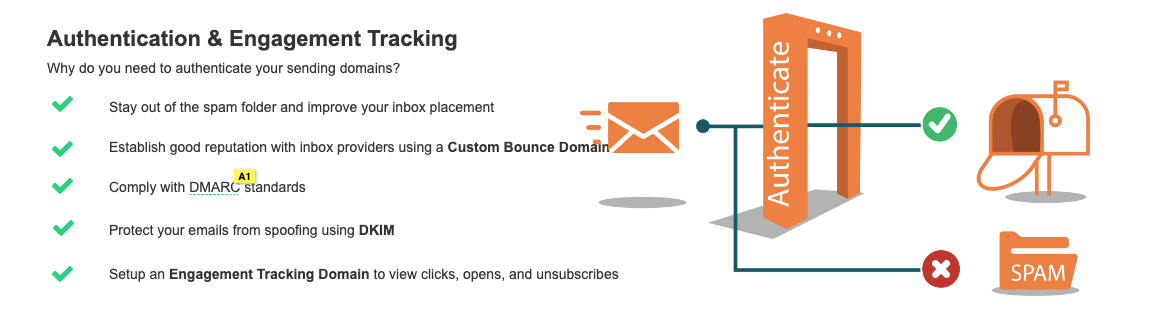
I applied my infographic design skills to create concise, visually engaging explanations to illustrate the role of authentication in preventing deliverability issues. By surfacing this information at the right moment in the journey,
Integration & Authentication Support
Challenge:
Getting users to fully authenticate and integrate with SocketLabs is complex because many of the tasks (such as configuring DNS records) happen outside the platform’s direct control.
Solution:
To further reduce friction, I created step-by-step instructions and expandable troubleshooting drawers, giving users contextual guidance without overwhelming them.
Testing the Onboarding Experience
Onboarding and Authentication Status
Driving First-Email Engagement
Challenge:
During onboarding testing , some users were dropping out of the wizard before completing integration or sending their first email. This created risk of churn, as they never experienced the value of the platform.
Solution:
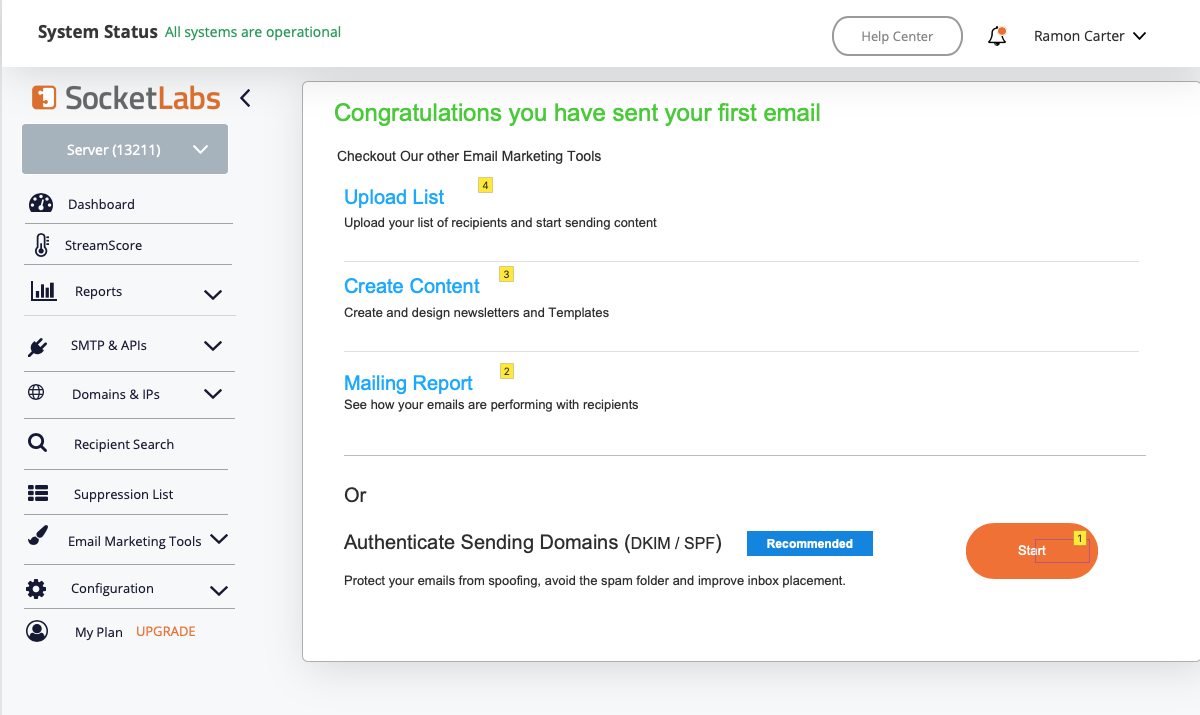
I introduced a setup status module on the dashboard to clearly show users what steps were remaining. I also added placeholder charts for email reporting, paired with a strong CTA — “Send your first email to see your reports.” This created a visual incentive and guided users toward completing their first send, turning onboarding into a momentum-building experience.