T-Mobile Plan and Device Purchase
T-Mobile Connect Saga Part 1
Overview
T-Mobile prepaid plans are typically an in-store offer that assistance may offer, but there was an opportunity to acquire customers online. The prepaid website needed a serious overhall regarding plan selection, account management, and checkout.
Role and Responsibilities: Facilitate the discussion surrounding the purchase path from discovery, design, development, testing, and Release.
Collaboration: Immediate Design team of 3 (part of a larger hub ) includeing ux writers, researchers, project managers , Product Managers, Project Managers, directors, researchers, UX writer, Marketing, Development
Users: T Mobile Prepaid Customers
Tools: Figma, Miro , UX Pin UserZoom
“Customers Changed the Conversation”
User Research and Discovery(Product and Plan selection problems)
Partnering with product, marketing, and engineering , I helped develop and facilitate a baseline research study of T-Mobile's prepaid experience. The findings revealed confusing terminology, inconsistent labeling, and friction in plan selection.
The research was especially eye-opening for marketing, who had been committed to the term "Connect," but users consistently found it unclear. These insights helped product prioritize quick wins at the top of the funnel while identifying key account management opportunities around upgrades and adding lines.
One of the most problematic elements was the Product Selector page, which attempted to combine plan, device, and service selection into a single screen. Key findings from user interviews and heuristic review included:
Hidden plan options within accordions caused many users to overlook available choices.
Unclear device selection flow—links felt disconnected from the main journey and did not preserve user progress.
Ambiguous service names created confusion, leading to “pogo-sticking” between service and plan pages to understand offerings.
These insights highlighted the need to restructure the purchase flow into a more familiar, step-by-step process, improving clarity and reducing drop-offs.
Building Alignment Through Heuristic Analysis
Heuristic Analysis
( looking at the current state through the lense of UX principles)
These sessions were an opportunity to evangelize UX thinking across the team. By reviewing the experience together through established UX principles, stakeholders gained a shared language for discussing usability and a clearer understanding of why certain design decisions would improve the customer experience.
Finding Our North Star
Mapping out Opportunities: Our research helped the team see where the biggest opportunities were, making it easier to define the scope of the redesign and focus on the highest-impact improvements first. I translated those insights into actionable personas that gave product, marketing, and engineering a shared view of who we were designing for.
Putting the research into something tangible gave everyone a North Star we could come back to throughout the project, helping keep conversations focused on real customer needs instead of opinions when making product decisions.
Sketching Solutions Together
With the overall purchase flow defined, I quickly sketched interaction concepts to explore different approaches and keep conversations moving. These low-fidelity concepts made it easy to collaborate with developers early, validating technical constraints and making sure our goals were realistic before investing in high-fidelity designs.
As the flow evolved, I designed for both new and existing customers—supporting plan selection during checkout as well as plan changes and upgrades from the account dashboard. Thinking through both journeys early helped create a consistent, scalable experience that worked across multiple customer scenarios.
Building Alignment Around the Journey
Experience Strategy with product and owners
Once the team aligned on the core customer problems, I led the effort to visualize a new experience strategy that everyone could react to, refine, and build toward. This approach helped us quickly validate the direction before moving into detailed UI design.
Plan Selection – Users begin by selecting a plan from a standardized, easy-to-browse plans page. Cart Interaction – After choosing a plan, users are taken to the cart, where they can either add a device or choose the Bring Your Own Device (BYOD) option. Checkout – From there, they proceed to a streamlined, mobile-optimized checkout experience.
By aligning on this experience strategy early, the team had a shared blueprint that guided product decisions, engineering discussions, and UI design throughout the project. The modular approach improved clarity for customers while creating a scalable foundation for future enhancements.
The PIVOT

Design Systems Collaboration
Working closely with the Design System team and marketing, we reviewed available components, explored styling options, and identified gaps where Prepaid had unique needs, such as tables and accordions that weren't yet part of the shared system. The Design System team was incredibly collaborative, while marketing brought campaign-driven visual ideas that were strong for print but needed refinement for digital products.
Together, we worked through those trade-offs, finding a balance between introducing the new campaign and maintaining a familiar experience. The goal wasn't to make the interface look different—it was to make it feel like a natural evolution of the product customers already knew.
Oh By The Way, we have a new look and Feel!” - Marketing
Evolving Without Starting Over
Midway through the project, a new requirement emerged: Prepaid needed to align more closely with the evolving Postpaid Design System—which was also being updated in parallel.
Fortunately, we had kept the experience strategy intentionally flexible. Rather than locking ourselves into rigid UI solutions, we focused on solving user problems first. That made it much easier to adapt without losing momentum—a lesson I've learned from experience.


Research by Design
Partnering with our researcher, we designed a series of tests around the areas we were most concerned about—including default plan selection, the meaning of the term "Connect," and how pricing influenced customer decisions.The researcher guided the testing strategy while I helped shape the scenarios and hypotheses we wanted to validate.
Turning Insights into Action
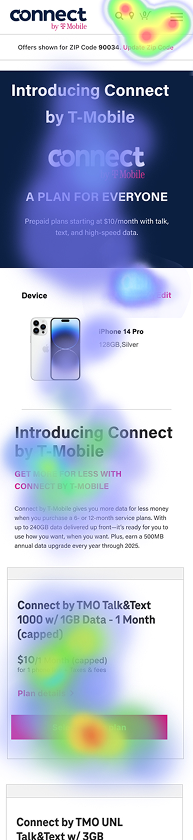
The results showed where users naturally gravitated, which elements captured attention first, and how visual emphasis influenced decision-making. Those insights gave the team confidence in some design choices while revealing opportunities to refine others before implementation.
Responsive Plan List & Plan Detail Pages (PLP & PDP) I designed responsive Plan List (PLP) and Plan Detail (PDP) pages that guided users from plan selection to checkout across mobile and desktop. PLP: A scannable comparison of available plans, pricing, and key features. PDP: Detailed plan information with clear next steps for add-ons or device selection.
The modular structure supports both new and existing customers while maintaining a consistent experience across breakpoints.
“Trying out the new Look, with a new Flow.”
Validating the New Direction
With the redesigned experience taking shape, we wanted to validate our assumptions before moving into development. Around this time, the User Research team introduced Maze, which was quickly becoming a valuable tool for rapid prototype testing and measuring first impressions across a user journey.
Cart Design: Guiding Users Through Device Selection
I designed the cart UI to immediately surface a visual alert when no device is associated with the plan. This prompt guides users to either: Shop for a phone from available devices Or Bring Your Own Device (BYOD) using a clearly labeled option
This decision point is central to the purchase journey, and the design ensures that users don’t get stuck or confused about next steps.By providing a clear and frictionless path forward, the cart experience supports both conversion goals and user confidence.
Aligning Through Research
We used Maze to test key assumptions around plan selection, terminology, and visual hierarchy.
The findings showed what users gravitated toward first, and we applied those insights across the entire journey—from mobile, PLP, PDP, from the landing page through the cart—to create a more consistent experience.
We have all the plans you need, for any entry point Device-First Flow – For users who begin by selecting a device before choosing a plan, this page presents a clean overview of all compatible plans in one place, making it easy to compare and select the best fit. Plan Changes from Account Dashboard – For returning users managing their existing service, this page serves as the go-to destination when switching plans from within their account.

Continued - T-Mobile Connect, Account Management
See how our strategy unified the purchase journey and account management.

In conclusion, the new design provided valuable insights into customer needs. uplift in products purchase and an alternative to in-store purchases aligning with the business goals and at the same time addressed serious user pain points.